Xtool Anyscan
XTOOLAuto & Vehicles
4.089.00 Reviews
- Version
- 4.40.61
- Installs
- 100.00K
- Age Rating
- Everyone
Screenshots
Our Review of Xtool Anyscan
 Analysis by Appyee
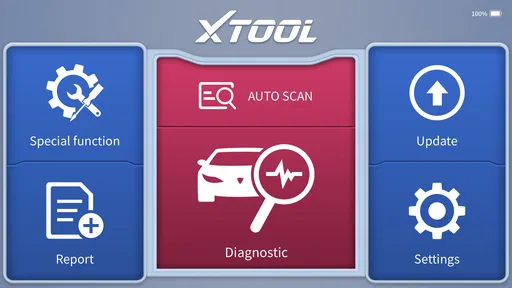
When I use a vehicle diagnostic app, I want it to do more than display a wall of codes. I need a clear path from a warning light to a sensible next step, whether I am checking my own car in the driveway or helping someone avoid an unnecessary trip to a workshop. Xtool Anyscan is built around that purpose: it works with XTOOL’s OBD diagnostic equipment and is aimed at both technicians and people who prefer to investigate car problems themselves.
That focus makes it different from the many generic car apps that only estimate fuel costs, track maintenance dates, or give basic explanations of dashboard symbols. This is an automotive diagnostic app. Its usefulness depends heavily on the compatible XTOOL hardware and on the vehicle being tested, so it is not something I would install expecting the phone alone to scan a car. Used with the right tool, though, it can turn an Android device into a practical part of a diagnostic workflow.
How Xtool Anyscan feels in everyday use
The app is free, suitable for Everyone, and comes from XTOOL. It has reached over 100K installs, with an average rating of 4.0 from around 865 ratings. Those figures suggest a reasonably established user base, but they also set the right expectation: this is a specialized utility, not a polished entertainment app designed for everybody.
My first impression is that the app makes most sense when I treat it as the screen and control center for a physical scanner. The phone is convenient because it is larger and easier to carry than a dedicated diagnostic display, while the scanner handles the connection to the vehicle. That arrangement is useful in a garage, on the roadside, or during a used-car inspection, provided the hardware, vehicle, and app are all communicating properly.
A realistic example is a check-engine light appearing before a long journey. Instead of immediately guessing that the problem is expensive, I can connect the compatible XTOOL scanner, open the app, and read the vehicle’s stored diagnostic information. The important benefit is not simply seeing a code. It is being able to record what appeared, clear it only when appropriate, and decide whether the car needs immediate professional attention or a more measured inspection.
I would still avoid treating any scan result as a final diagnosis. A fault code usually points toward a system or condition, not automatically toward one failed part. A sensor code can be caused by wiring, a connector, a vacuum issue, or another problem that produces the same symptoms. The app is most valuable when it helps me ask better questions and organize the next test, rather than when I use it as a substitute for mechanical knowledge.
Why the hardware relationship matters
The biggest practical question before downloading it is simple: do you already own a compatible XTOOL diagnostic device? If the answer is no, the free app by itself is unlikely to offer much value. This is not a phone-only scanner that can magically access a vehicle through the screen. I would check compatibility before buying anything, especially if I intend to use the app with several vehicles rather than one familiar car.
That dependence is also one of its strengths. A dedicated OBD interface can provide a more dependable connection than improvised wireless adapters, while the phone gives the workflow a familiar interface. For a technician, that can be more flexible than carrying a separate display for every task. For a casual owner, it means the total cost and setup are tied to the scanner, even though the app itself does not charge an app price.
Connection problems are the kind of friction I would expect to encounter. The vehicle must be in a suitable state, the diagnostic connector must be accessible, and the scanner must communicate correctly with both the car and the phone. If a scan fails, I would first check the physical connection and power state before assuming the app is broken. This sounds basic, but it prevents a common mistake: interpreting a communication error as proof that the vehicle has no fault or that a major control unit has failed.
A useful workflow for DIY owners
For a home user, I would use the app in a disciplined sequence. First, I would note the symptoms: when the warning appeared, whether the engine was cold or warm, and whether the vehicle changed behavior. Then I would connect the XTOOL device, read the available information, and save or write down the results before clearing anything. Only after that would I inspect the obvious physical causes, such as loose connectors or recent work around the affected area.
Read first, document second, clear last is the habit that makes a diagnostic app genuinely useful. Clearing a warning before recording it can remove context that a technician needs later. It can also make a temporary problem look resolved when the underlying issue is still present. I would never clear a code simply to turn off the dashboard light before a vehicle inspection or a long trip.
Another useful approach is to compare the scan with the car’s behavior instead of relying on the code alone. If the app identifies an emissions-related issue but the vehicle runs normally, that still deserves attention, but it may not require the same immediate response as a fault accompanied by stalling, overheating, or loss of braking assistance. The app supplies information; judgment comes from combining that information with symptoms and safe mechanical checks.
Where it helps technicians more than casual drivers
Technicians are likely to get more from Xtool Anyscan because they already understand diagnostic terminology and know how to verify a suspected fault. For them, the phone-based interface can fit into a mobile workflow: inspect a vehicle, capture diagnostic information, discuss the result with the owner, and continue testing without moving to a separate workstation for every basic step.
The app can also be useful during a used-car inspection, but only if the buyer understands its limits. A clean scan is encouraging, not proof that the car is mechanically sound. Some problems are not active at the moment of inspection, some may not trigger a stored code, and a seller could have cleared recent faults. I would combine the scan with a cold start, a road test, service records, and an independent mechanical inspection when the purchase is significant.
For a small workshop or mobile mechanic, the main advantage is portability. A phone is easier to carry around a vehicle than a bulky diagnostic station. The trade-off is that a phone interface may not feel as specialized or robust as a dedicated professional scanner, particularly when the job involves repeated testing, detailed reports, or several cars in quick succession. The better choice depends on whether portability or a purpose-built workstation matters more in the daily routine.
What the current release tells me
The current version is 4.40.61, and the app was released on June 25, 2023. That gives the product a defined history rather than making it feel like a brand-new experiment. I see the version number as evidence that the app has continued through development, but I would not confuse a newer version with a guarantee that every vehicle or scanner behaves identically.
For existing users, the practical effect of staying current is usually less about dramatic visual change and more about maintaining compatibility and stability as the surrounding diagnostic ecosystem evolves. An app like this sits between a mobile operating system, XTOOL hardware, and vehicle electronics. A change in any one of those areas can affect the experience. Keeping the app updated is sensible, but I would also avoid updating immediately before an important inspection unless I have time to test the complete setup.
That is especially relevant for technicians who depend on predictable routines. Before a busy day, I would connect the scanner to a vehicle I know, confirm that the app opens normally, and make sure the workflow I rely on is still available. This small check can prevent an avoidable interruption when a customer’s car is already in the bay.
New users should also approach the version number realistically. It indicates an actively maintained product line, but it does not tell me that the app will support every make, model, module, or advanced procedure I might want. Coverage is a separate question. I would verify the intended vehicle and diagnostic task before assuming that the app and scanner combination can handle it.
Where it falls short compared with other choices
The usual alternative for a casual driver is a low-cost generic OBD adapter paired with a broad third-party app. That route can be cheaper and may be enough for reading common engine codes. It can also be inconsistent: adapter quality varies, connection behavior can be unreliable, and the app may explain codes in a way that encourages oversimplified repairs. Xtool Anyscan is the better fit when I want an ecosystem centered on XTOOL hardware rather than a random adapter.
The other alternative is a dedicated professional scan tool. A separate device may offer a more focused interface, stronger workshop ergonomics, and a design built around repeated diagnostic work. Xtool Anyscan has the advantage of using a phone that I already know how to operate, but that convenience does not automatically make it the superior choice for a busy shop. If I spend all day scanning vehicles, a dedicated tool may be more comfortable and efficient.
There is also a safety boundary. I would not use a phone-based diagnostic setup while driving, and I would not perform a scan in a location where the vehicle could move unexpectedly. Diagnostics should happen with the car safely parked and with attention on the physical environment. The app can help me understand a problem, but it should never encourage me to ignore a serious symptom because the scan appears reassuring.
Another limitation is the learning curve. Someone unfamiliar with diagnostic codes may see technical terms without knowing which tests should follow. The app can be a useful starting point, but a beginner may need a repair manual, trustworthy technical guidance, or a qualified mechanic. The best DIY user is not the person who clears the most warnings; it is the person who knows when the evidence is incomplete and stops before making the problem worse.
Small habits that make the app more useful
I would keep a simple record for recurring faults. Writing down the date, mileage, symptoms, code, and whether the issue returned after clearing can reveal a pattern that one isolated scan cannot. This is particularly helpful for intermittent warnings. A technician can do more with a timeline than with the vague statement that “the light came on once.”
I would also scan before replacing parts whenever possible. Replacing a component solely because its name appears in a code is an expensive form of guessing. A better workflow is to use the scan to identify the system, inspect related wiring and connectors, check the symptoms, and then confirm the suspected cause with the appropriate test. This is where the app’s value goes beyond convenience: it supports a more careful decision process.
For a family with several cars, I would label notes clearly by vehicle rather than assuming I will remember which scan belonged to which car. Different vehicles can produce similar codes for very different reasons. Keeping the information separated avoids carrying an old diagnosis into a new problem, especially when multiple people use the same phone or scanner.
Finally, I would treat clearing codes as a verification step, not a repair. If a loose connector is corrected and the warning disappears after a proper retest, that is useful evidence. If the warning returns, the result is equally useful because it confirms that the issue remains. Either way, the scan should be part of a loop of observation, repair, and verification.
Who should install it?
I recommend Xtool Anyscan to an XTOOL owner who wants a mobile interface for vehicle diagnostics and is comfortable learning what scan results mean. It is also worth considering for a technician who values portability and already works within the XTOOL ecosystem. The free price makes trying the app less risky, although the required hardware remains the important practical consideration.
I would skip it if I only want maintenance reminders, fuel tracking, or a simple explanation of dashboard icons. I would also look elsewhere if I need a guaranteed all-makes professional platform without first checking compatibility. A generic reader may be sufficient for a single basic engine-code check, while a dedicated professional scanner may be a better long-term investment for intensive workshop use.
The Everyone content rating makes it approachable from an age-classification perspective, but that should not be mistaken for mechanical simplicity. Vehicle diagnostics involve electrical systems, moving parts, and decisions that can affect safety. A younger or inexperienced user should work with an informed adult and avoid touching anything beyond safe, stationary inspection.
What I would watch before relying on it
If I were deciding whether to make this part of my regular toolkit, I would watch three things: compatibility with the vehicles I actually service, the reliability of the scanner-to-phone connection, and how comfortably the workflow handles repeated inspections. Those questions matter more than the app’s download count or its appearance on a phone.
I would also pay attention to how the product evolves between versions. The current release shows ongoing development, but what matters to me is whether updates improve the tasks I perform: connecting consistently, presenting diagnostic information clearly, and preserving a dependable workflow for existing users. I would test after an update rather than assuming that every change will affect my particular vehicle in the same way.
My final view is positive but practical. Xtool Anyscan is not a magic repair assistant and it is not a replacement for a mechanic’s testing skills. It is a focused companion for XTOOL diagnostic hardware, and that focus is exactly why it can be useful. If you already have compatible equipment and want a portable way to investigate warning lights, document faults, and guide the next repair step, Xtool Anyscan is a sensible app to try. If you do not have the hardware or only need basic car ownership tools, its specialized design will probably feel like unnecessary complexity rather than an advantage.
Verdict
Strengths of Xtool Anyscan
- Supports many vehicle makes and professional diagnostic functions.
- Live data monitoring helps identify faults beyond basic code reading.
- Regular software updates can expand coverage for newer vehicle models.
- Portable design makes workshop and on-site diagnostics more convenient.
- Useful service functions support maintenance and troubleshooting tasks.
Limitations of Xtool Anyscan
- Compatibility and feature depth vary significantly by vehicle model and year.
- Some advanced functions may require paid subscriptions or additional purchases.
- Initial setup can be confusing for users unfamiliar with diagnostic tools.
- Performance depends on a stable Bluetooth or wired connection.
- Hardware cost may be high for occasional or home users.
Similar Picks in This Category
View All
Android Auto
Google LLC4.1

maxim — order a taxi & food
PT. SITO4.7

Штрафы ГИБДД: проверка с фото
Pays LLC – Штрафы ГИБДД4.7

Номерограм – проверка авто
Авто Ассист4.8

Дром Авто
Дром4.9

Frequently Asked Questions
What is Xtool Anyscan, and what can it do?
Xtool Anyscan is a mobile diagnostic application designed to work with compatible xTool vehicle diagnostic devices. After connecting the adapter to a supported vehicle, the app can help read and clear fault codes, display live data, access diagnostic functions, and provide information about vehicle systems. Its exact capabilities depend on the adapter, vehicle model, software version, and available manufacturer-specific coverage.
Which vehicles and diagnostic adapters are compatible with Xtool Anyscan?
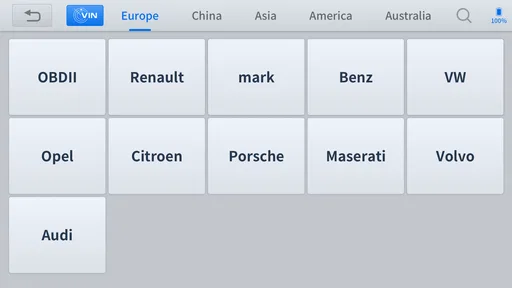
Compatibility is one of the most important points to check before downloading Xtool Anyscan. The application is intended for use with supported xTool Anyscan hardware and may not function with generic Bluetooth OBD adapters. Vehicle coverage can vary by make, model, year, engine, control module, and region, so users should consult xTool’s official compatibility list and confirm that both their diagnostic device and vehicle are supported before purchasing or relying on the app.
Does Xtool Anyscan require an internet connection or an account?
An internet connection may be required for downloading the application, registering or activating the diagnostic device, signing in, updating vehicle software, and retrieving certain diagnostic resources. Some basic functions may remain available after the required data has been downloaded, but this can differ by product and feature. Users should also expect to create or use an xTool account if the app requests one during setup or activation.
Is Xtool Anyscan suitable for beginners, or is it intended for professionals?
Xtool Anyscan can be useful for both experienced technicians and vehicle owners who are comfortable following diagnostic instructions, but it is not a substitute for mechanical knowledge. Reading a fault code does not automatically identify the failed component, and clearing codes without repairing the underlying problem may hide important warnings. Beginners should use the app carefully, avoid changing coding or service settings without understanding them, and seek professional advice when necessary.
What should I check before using Xtool Anyscan on my vehicle?
Before starting a diagnostic session, verify that the vehicle battery is sufficiently charged, the ignition procedure matches the app’s instructions, and the diagnostic adapter is firmly connected. Keep the phone’s Bluetooth, Wi-Fi, and permissions enabled when required, and avoid disconnecting the adapter during communication or software updates. It is also wise to save existing fault codes and live-data information before clearing anything, since some functions can affect vehicle settings or erase useful diagnostic evidence.
